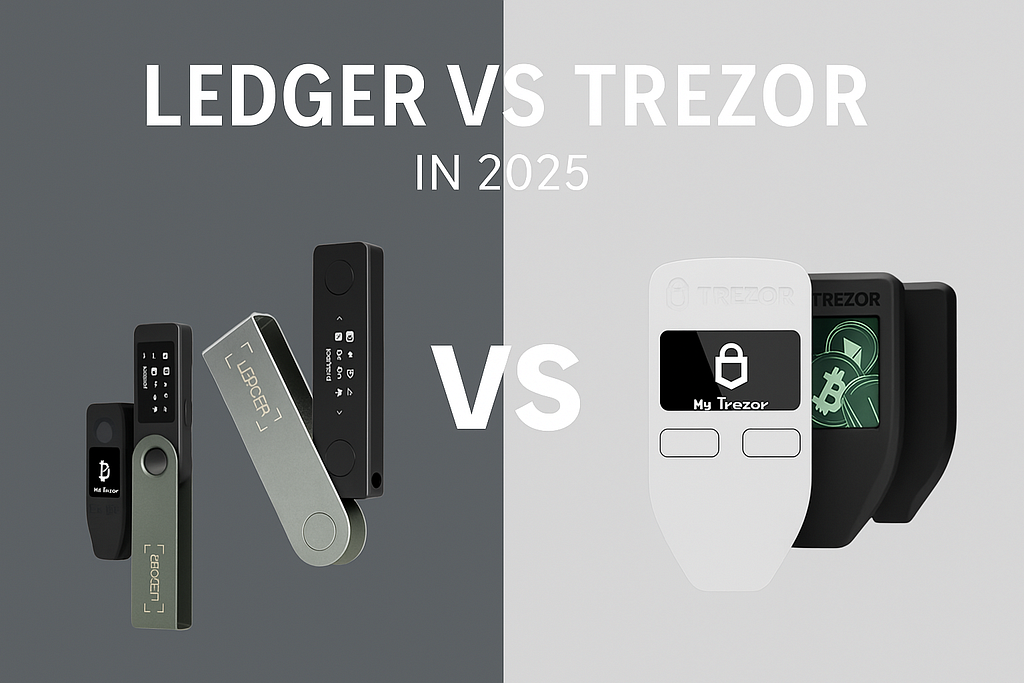
Crypto holders, investors, and traders often ask which is the best hardware wallet for crypto security. In 2025, two leading brands dominate the market: Ledger (with the Nano X and Nano S Plus) and Trezor (with the Model T and Trezor One). This comprehensive comparison breaks down their features in a clear, listicle format — so you can quickly scan key points like display, security, mobile use, staking, DeFi, and NFT wallet compatibility. Each section provides concise answers to common questions, helping you decide Ledger vs Trezor 2025 based on your needs.
How do Ledger and Trezor differ?
In short, Ledger offers mobile connectivity, broad coin support (5,500+ coins), and built-in staking and NFT functions.
Trezor prioritizes transparency with open-source firmware, a simple interface, and robust security practices.
Below, we compare the Ledger Nano X and S Plus versus the Trezor Model T and One in detail, covering everything from screens and materials to DeFi and staking. Let’s dive in!
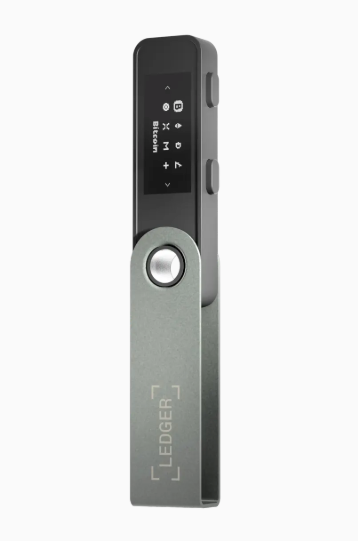
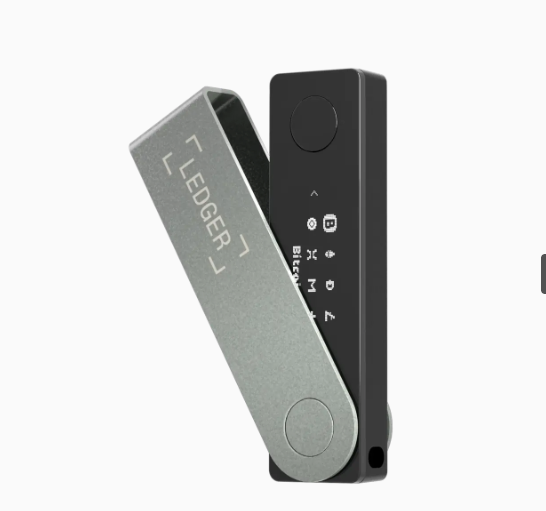
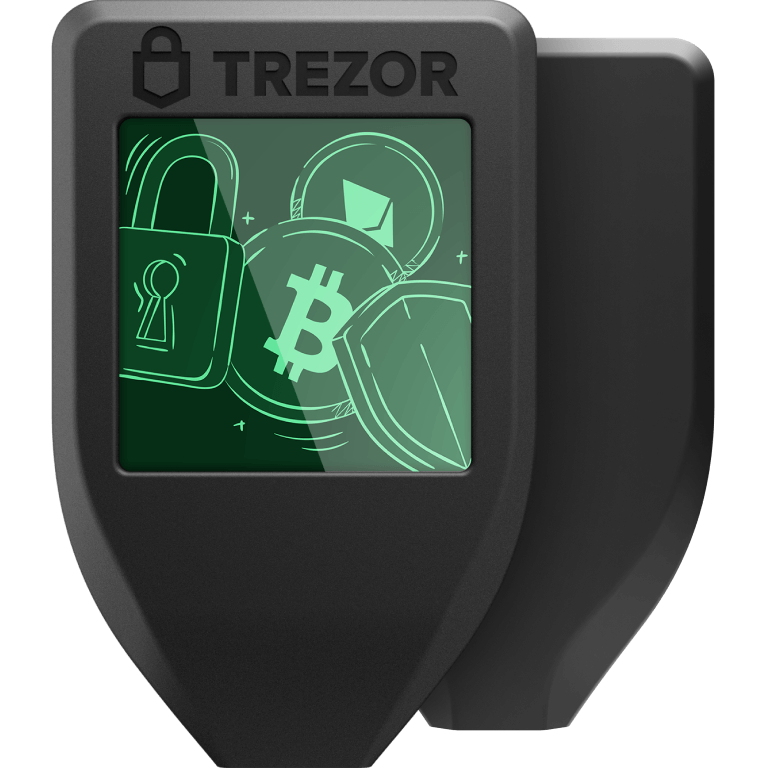
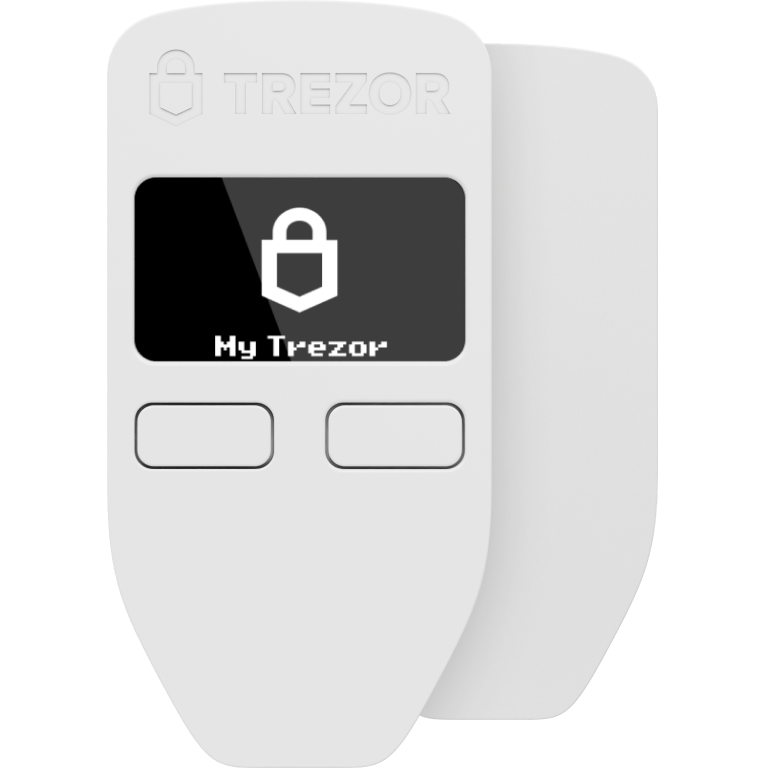
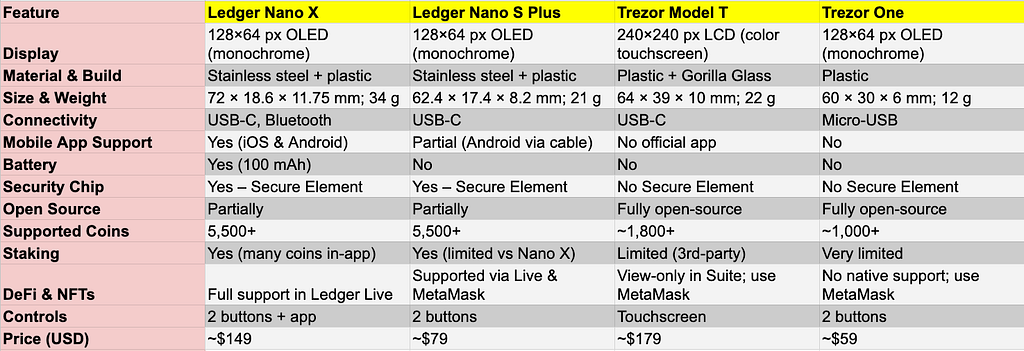
The Trezor Model T’s color touchscreen (240×240 pixels) offers a clear, intuitive interface for managing crypto. Its vibrant display makes it easy to review addresses and approve transactions on the device itself. By contrast, Ledger devices like the Nano X and S Plus have smaller 128×64 pixel monochrome screens. These OLED displays are sharp but only text-based, requiring users to scroll to see long addresses.
Basic models from both brands share similar screens. The Ledger Nano S Plus and Trezor One each use a small monochrome OLED with 128×64 resolution. They can clearly display menus and wallet addresses, but the limited size means you might scroll or verify sections in chunks. The premium Trezor Model T stands out with its large color touchscreen (1.54″, 240×240 px), which can show more information at once. This touchscreen isn’t just about looks — it improves usability by allowing on-device PIN entry and direct confirmation via touch, rather than clicking through letters with buttons.
For many users, screen size and quality impact everyday convenience. A bigger display like the Model T’s makes verifying your recipient’s address or viewing transaction details more comfortable (no need to squint or scroll as much). The color interface can also reduce errors, as icons and warnings are more visually distinct. The Ledger Nano X/S Plus screens are smaller, but still sufficient for confirmation codes and short text. They use simple text prompts and require you to confirm by pressing physical buttons. In practice, both Ledger and Trezor displays get the job done for security confirmation. However, if you prefer a richer visual experience — for example, seeing a full address or a lock icon in color — the Trezor Model T’s screen delivers that extra clarity.
Common question: “Does the Ledger Nano X have a touchscreen?” — No, the Nano X uses a monochrome OLED screen controlled by two buttons, while only the Trezor Model T has a full touchscreen among these models. The touch display on Model T makes tasks like entering passphrases much easier, which leads us to the next point: how you interact with these devices.
Ledger Nano X features a sleek design with a brushed steel swivel cover protecting the plastic body. Ledger’s signature design resembles a sturdy USB stick, with a metal casing that swings out to reveal the screen. This steel cover adds durability, shielding the screen when not in use and giving the device a premium feel. The chassis underneath is made of high-quality plastic, keeping it lightweight yet solid. Users often praise the Ledger Nano series for feeling robust and “built like a tank” despite their small size.
Trezor devices take a different approach. Both the Trezor One and Model T have plastic enclosures, which make them extremely lightweight (12g and 22g respectively). The Model T’s build quality is enhanced by a Gorilla Glass 3 cover over its touchscreen for scratch resistance. While plastic might sound less durable, the Trezor’s build is still quite sturdy for normal use. The devices are built to survive everyday bumps, though they might scuff if kept with keys or loose in a bag. Trezor’s casing is a single molded piece designed to show any tampering — older Trezor One units even came with tamper-evident holographic seals on the box.
In terms of shock resistance, Ledger’s steel and plastic combo likely offers a bit more protection if dropped. The metal hinge and cover on the Ledger Nano X can absorb impact and protect the screen. The Trezor Model T’s screen has hardened glass, which is resilient, but the overall device is slightly larger and all-plastic, so it may not handle drops as well as a closed Ledger stick. That said, under normal use (sitting on a desk or carried in a pouch), both wallets are quite durable. Many users choose a case or lanyard for added safety — for instance, Ledger sells a silicone case, and Trezor Model T includes a magnetic dock that lets you mount it (and can also serve as a protective holder).
Design & feel: The Ledger Nano X/S Plus have a minimalist, premium feel due to the cold metal exterior. The swivel cover snaps into place, giving tactile feedback. Trezor Model T has a more utilitarian design — a small rectangular device with a curved base. It’s light in the hand and easy to grip, and the color screen gives it a modern touch. Trezor One, being older, is very simple: a tiny black or white plastic fob with two front buttons and an OLED screen. It’s not flashy, but it’s iconic in its simplicity.
One thing to note: neither brand’s devices are water-resistant or ruggedized to extreme standards. They are meant to be kept safe, dry, and not subjected to harsh conditions. The good news is they’re small and easy to secure. If build material is a key concern for you, Ledger’s steel casing might inspire more confidence. If weight and portability are your focus, Trezor’s lightweight plastic wins. In either case, both Ledger and Trezor are well-built for long-term use, and many users have devices that still work perfectly after years of handling.
When it comes to carrying your hardware wallet around, smaller is usually better. Here’s a quick look at the physical dimensions and weight of each device:
As the numbers show, the Trezor One is extremely compact and feather-light. It’s about the size of a car key fob and weighs only 12 grams — you might forget it’s in your pocket! The Ledger Nano S Plus is a close second in portability, shaped like a slim USB drive with a metal cover. It’s slightly longer than the Trezor One but still very small and light (21g). The Ledger Nano X, with its battery and Bluetooth hardware, is a bit larger and heavier at 34g. It’s roughly like a USB thumb drive with a cap, and still very pocket-friendly. Finally, the Trezor Model T is the largest of the four, although “large” is relative — it’s only about 6.4 cm tall and weighs 22g, similar to a small pager or a chunky car key.
In practice, all these devices are highly portable. You can easily carry any of them in a pocket, purse, or backpack. The Ledger devices (Nano X and S Plus) have that swivel cover which protects the screen and buttons, making them suitable to toss into a bag without much worry of damage. The Trezor devices do not have a cover, so you might want to use the included lanyard or a small case to prevent scratches to the screen (especially for the Model T’s touch display). The Model T comes with a magnetic dock — you can stick the dock to a surface and magnetically attach the Trezor to it when not in use, which is a neat way to store it at home.
For those who travel often, Ledger Nano X is particularly convenient: it’s compact and doesn’t need a cable (thanks to Bluetooth, which we’ll discuss soon). This means fewer accessories to carry. The Nano S Plus and Trezor One will both require you to carry a USB cable if you intend to connect on the go, but they themselves take up virtually no space. The Trezor One could even fit in some wallets given its flat, credit-card-key size.
In summary, you won’t have trouble carrying any of these hardware wallets around. The differences in size and weight are relatively small — none are bulky. If we compare directly, Ledger devices are longer and narrower, while Trezor devices are shorter and a bit wider due to their shape. The Nano X is slightly bigger than the S Plus (to accommodate the battery), and the Model T is bigger than the Trezor One (to accommodate the touchscreen). Portability is excellent across the board, but if every gram and millimeter counts, Trezor One is the champ for minimalists. Meanwhile, the Nano X offers portability plus wireless use, which might tip the scales for frequent travelers.
(Ledger Nano X is slightly smaller than the Trezor Model T, making it easier to carry discreetly. In contrast, the Trezor Model T’s broader shape might be a bit more noticeable in your pocket, but it’s still very easy to hide or store.)
One of the biggest practical differences between Ledger and Trezor is how they handle mobile use. If you want to check your crypto or make transactions from a smartphone, the options differ:
In summary, if mobile transactions and on-the-go access are important to you, Ledger Nano X is the clear leader. It was designed for “mobile-first” use. With the Nano X, you can check your portfolio and send crypto anywhere, without needing a laptop. The Bluetooth is encrypted and requires you to physically approve everything on the device, so your keys remain secure. (For peace of mind, you can also disable Bluetooth if you’re not using it.)
The Ledger Nano S Plus offers partial mobile support (Android only, via cable). It’s a budget way to use a phone for crypto, but less convenient as you must plug in each time.
For Trezor users, the lack of a mobile app is a conscious security choice (Trezor focuses on desktop usage). This means if you choose Trezor, plan to do your transactions from a computer for the most part. Some advanced users do connect Trezor to mobile via third-party wallets, but it’s not a plug-and-play official solution. Trezor Suite is purely a desktop app (Windows, Mac, Linux). The company recommends using the device in a secure environment — typically your home PC — rather than on mobile, which could be less secure or more prone to loss.
One common question is: “Can I use Trezor with my smartphone?” The answer: Only with Android, via an OTG cable, and typically using third-party wallet interfaces. There is no Trezor app for iPhone or Android that lets you transact fully. On the other hand, Ledger Live is a very polished mobile app for both Android and iPhone, so Ledger wins for mobile-friendliness.
To illustrate, imagine you’re out and want to trade some crypto or buy an NFT: with Ledger Nano X, you could whip out your phone, open Ledger Live, turn on the Nano X and quickly authorize the transaction — all without a laptop. With Trezor, you’d likely have to wait until you’re back at a computer (unless you carry a laptop or try some complex phone setup). So for active traders and those who travel often, Ledger (especially Nano X) offers peace of mind that you always have access to your hardware-secured funds.
However, if you mostly use crypto from home or the office, the mobile aspect might not matter as much. Many long-term holders use Trezor devices without any need for mobile, managing their portfolio on desktop only. It really depends on your use case.
Key takeaway: If you need true mobile access to your cold wallet, go with Ledger (preferably Nano X). If mobile access isn’t a priority, all devices work great with desktop, but Trezor lacks on-the-go convenience.
When it comes to crypto wallet security, both Ledger and Trezor are industry leaders known for keeping your private keys safe. However, they take different approaches to security:
Security summary: Both wallets keep your private keys offline and safe from online hacks and malware — that’s their core purpose. Ledger has a slight edge in hardware security due to the secure element (making it tougher for thieves to extract keys). Trezor has an edge in transparency and user autonomy (anyone can verify the device code, and there’s no hidden chip or closed source). Importantly, neither Ledger nor Trezor has had a breach of their cryptographic security in real-world use — if you follow best practices (keep your seed phrase secure, use a PIN/passphrase, and don’t fall for phishing), your crypto is extremely safe with either.
For ultra-paranoid users, you can add a strong passphrase on a Trezor which essentially nullifies the known physical attack risk. Ledger users have to trust the secure element and closed firmware but benefit from the hardest physical security.
One could say: Ledger = higher hardware security, slightly lower transparency. Trezor = ultimate transparency, slightly lower physical security. Both support BIP39 seed phrases, so you can move between wallets if you ever wanted (e.g., import your recovery phrase into another device — though caution is advised when doing so).
In conclusion on security: Ledger and Trezor are both excellent for crypto wallet security — far better than keeping coins on an online exchange or software wallet. The choice often boils down to whether you trust Ledger’s secure element or prefer Trezor’s open approach. Many analysts note that Ledger devices have not been hacked, whereas Trezor wallets have been cracked under lab conditions. But in everyday use, both are extremely secure if used properly. Always keep your recovery seed offline and secret — that’s rule number one.
Budget is an important factor, and here we see clear differences between these models. Let’s list the approximate prices (in USD):
(Prices are official as of 2025; you might find discounts or bundles occasionally.)
At the entry-level, the Trezor One is one of the most affordable hardware wallets on the market. Around $59, it’s a great value for securing crypto, provided you don’t need support for certain coins it lacks (like Cardano or XRP). The Ledger Nano S Plus is about $20 more, but what do you get for that extra cost? Mainly, much broader coin support and more memory. The Nano S Plus can handle thousands of tokens and many apps simultaneously, whereas the Trezor One’s limitations mean some users might outgrow it if they venture into less common altcoins or DeFi tokens. If you only plan to stick to Bitcoin, Ethereum, and a handful of majors, the Trezor One is superb value. But if you want maximal flexibility under $100, the Nano S Plus offers more bang for the buck in terms of supported assets.
In the premium range, the decision is between the Ledger Nano X at ~$149 and the Trezor Model T at ~$179. These two are often compared head-to-head. The Nano X is about $30 cheaper and offers Bluetooth mobility and a slightly more solid build (steel cover). The Model T is a bit more expensive, and what you’re paying for is the color touchscreen and the Trezor’s open-source ethos. From a value perspective, if you need Bluetooth or plan to frequently use your wallet with a phone, the Ledger Nano X may be the better deal — you save money and get that wireless feature. On the other hand, if you strongly prefer a touchscreen and Trezor’s philosophy, the Model T’s price is justified by its user-friendly screen and advanced features like Shamir Backup (allowing you to split your recovery seed into multiple parts for extra security).
It’s also worth noting that Ledger has other models (like the high-end Ledger Stax at ~$279) and Trezor introduced new editions (Trezor Safe 3 and Safe 5). However, since we’re focusing on Nano X/S Plus vs Model T/One, we’ll stick to those. Just know that the landscape includes a few other choices if budget is no issue (Ledger Stax for a luxury option, or new Trezor Safe series with slight enhancements). For most, the four devices we discuss hit the main price points: ~$50, ~$80, ~$150, ~$180.
Value considerations
In terms of price comparison in 2025, it’s interesting to note that both brands have kept their flagship models (Nano X and Model T) at roughly the same price for a few years, indicating stable demand. Trezor also released the “Safe 3” at $79 to slot in between the One and Model T, likely to offer an updated budget option with more coin support (since Trezor One lacks some coins). Ledger, conversely, introduced a premium “Stax” and an experimental “Flex” model for enthusiasts, while keeping the S Plus and X as mainline.
Are there discounts? Sometimes, yes. Both Ledger and Trezor run occasional promotions (like holiday sales). As an example, in May 2025 Trezor ran a discount campaign for Trezor One and Model T. Ledger often has bundle deals (e.g., Backup Pack: Nano X + Nano S Plus together for a reduced combo price). If you’re not in a rush, keeping an eye out for Black Friday or other promotions could save you some money.
Overall, all four devices offer great value in the sense that any hardware wallet, even at $180, is cheap insurance compared to the potential loss from a hacked software wallet or exchange theft. The choice comes down to how much you’re willing to spend for extra features and comfort:
Many users ultimately consider not just price, but what they’re getting for that price. In this case, Ledger Nano S Plus is arguably the best “value for money” given its low price and high functionality (aside from lacking Bluetooth). Trezor One is the best “budget” option if its limitations don’t bother you. The Nano X and Model T are both premium; Nano X might edge out in value if you count Bluetooth as worth more, whereas Model T’s value is in user experience and security transparency.
Hardware is only half the story — the companion software that you use to manage the wallet is crucial for user experience. Ledger and Trezor have different software ecosystems:
Ledger Live (Ledger’s app): Ledger Live is a unified app available on Desktop (Windows, Mac, Linux) and Mobile (iOS, Android). It allows you to do everything in one place:
Ledger Live is known for being user-friendly and regularly updated. Crucially, it’s the same app for all Ledger devices — whether you have Nano S Plus, Nano X, or even older Nano S, you use Ledger Live. This consistency is nice; for example, if you upgrade from Nano S Plus to Nano X, you don’t have to learn anything new in software.
Trezor Suite: Trezor Suite is the official software for Trezor devices. It is available as a Desktop application (Windows, Mac, Linux) and also as a Web app (you can access it through in a browser). Notably, Trezor Suite is not on mobile; it’s desktop-focused. (There was a beta Trezor Suite app for Android announced, but as of 2025, it only offers portfolio watch functionality and not full transaction support.) So practically, you will use Trezor Suite on your computer.
Trezor Suite allows you to
Trezor Suite’s design is modern and beginner-friendly. It emphasizes security (it will remind you about things like checking addresses and running the latest firmware). It also has a nice password manager feature if you use Trezor as a U2F device.
One difference: Trezor Suite might not support every single coin natively. Some coins require using a third-party wallet. For example, Trezor can hold Cardano ADA, but to manage it you might need to use an external wallet like AdaLite or Exodus (though this may change as Trezor Suite expands support). In the Suite interface, certain less common coins may prompt you to use a compatible wallet or software. Ledger Live similarly doesn’t support every coin (some coins require third-party wallets or Ledger Live plugins), but it covers more within the app (Ledger Live supports 5000+ assets largely through app plugins).
Third-Party Wallet Compatibility: Both Ledger and Trezor can be used with a variety of third-party wallets and services:
According to one comparison, Ledger officially supports about 15 third-party wallet integrations, while Trezor supports about 6. This suggests Ledger has broader compatibility with various apps and services out of the box. For example, if you use the Kyber Network (a DeFi exchange), it specifically supports Ledger but not Trezor. Meanwhile, if you use MetaMask, both are supported; if you use Exodus, only Trezor is supported natively.
Ease of Setup: Both Ledger Live and Trezor Suite guide users through setup in a straightforward way. Trezor’s setup might be a tad simpler, since there’s no need to install separate coin apps on the device (Trezor has all coins’ support built into firmware). With Ledger, you often have to install apps for each blockchain (Bitcoin app, Ethereum app, etc.) through Ledger Live — it’s easy, but it’s an extra step that Trezor doesn’t have (Trezor devices come pre-loaded with support for everything it can handle). This can matter if you plan to use tons of different coins at once; the Ledger Nano S Plus and X have plenty of storage for many apps (up to 100 apps installed at once), whereas older Ledger Nano S had very limited space (2–3 apps). Ledger Nano S Plus/X and Trezor Model T/One can all handle multiple assets conveniently now. Trezor still wins slightly on the simplicity of not juggling app installations.
Updates and Support: Both apps receive updates. Ledger Live updates often include new features (like adding NFT support, new coin integrations, DeFi apps). Trezor Suite updates might add support for a coin or a new feature like CoinJoin. Since both companies are reputable, they maintain their software well.
One thing to highlight: Trezor Suite is open-source too, and even has an option to run via Tor for privacy. If you’re privacy-conscious, the ability to route your connection through Tor (with a simple toggle in Trezor Suite) is a nice feature — it means even Trezor’s servers (which fetch rates and block data) won’t easily see your IP address. Ledger Live does not have a Tor feature and is not fully open-source (though parts are). However, Ledger Live does allow opting out of analytics and you can connect it to your own Bitcoin node if you want advanced privacy.
User experience differences
Compatibility summary: If you stick to using the official apps:
If you like using third-party wallets, consider the specific integrations you need. For example:
In a nutshell, Ledger Live vs Trezor Suite: Ledger Live is more comprehensive and convenient, Trezor Suite is simpler and very security-focused. Many investors appreciate Ledger’s staking and NFT management right in the app. On the other hand, some prefer to keep things minimal and use Trezor Suite just for secure transactions, using third-party apps only when necessary.
How you interact with these wallets is a key part of the experience. Ledger Nano X / S Plus and Trezor One rely on buttons, whereas Trezor Model T offers a touchscreen.
Pros and cons of each control scheme
A side note: The Ledger Nano X and S Plus have an additional convenience — they can use the two buttons to control the Ledger Live mobile app when needed (like to initiate pairing). The Trezor Model T’s touchscreen allows it to do things like display a full QWERTY keyboard for entering a passphrase on-device, which is a big security advantage (since you’re not typing that secret on your computer at all).
The user interface on the devices themselves is minimal. These hardware wallets aren’t meant for extensive interaction beyond confirmations. Most of the heavy UI (portfolio, selecting coin, etc.) is done on the computer/phone. The device UI is mainly for security-critical actions:
How does this matter for you? If you value ease of use, the Trezor Model T’s touchscreen gets a lot of praise. It’s often recommended for less tech-savvy folks because touching a screen is intuitive (entering a PIN like you do on an ATM touchscreen). If you don’t mind a couple of buttons and actually prefer the tactile feel, Ledger or Trezor One are absolutely fine. After a week of use, muscle memory kicks in and using the buttons becomes second nature.
For example, confirming a Bitcoin send:
Both are secure because they require you to physically verify and approve on the device. None of these devices will send funds without button presses or taps confirming it.
One more thing: The Ledger Nano X/S’s buttons serve as a second factor — for instance, if your computer is compromised and tries to send a transaction, it can’t confirm it on the device without you pressing. Similarly on Trezor Model T, nothing happens without your touch input.
In summary on controls
Many people who have used both note that the Model T’s touchscreen is a joy when setting up or entering passphrases, whereas entering a 20-character passphrase with Ledger’s two buttons can be a bit of a chore. But keep in mind, not everyone uses passphrases or frequently needs to type on the device — for normal daily sends, buttons vs touch doesn’t make a huge difference in time (maybe a few seconds difference).
Finally, it’s worth noting that the Model T and the Ledgers both allow full operation without ever exposing secrets to the PC. The Model T achieves this by letting you do everything on-screen (enter PIN, passphrase), and the Ledgers achieve it by requiring confirmations on device and never outputting the private key or seed. So both are secure; the Model T just gives you more input options on-device.
With the rise of proof-of-stake cryptocurrencies, many holders want to stake their coins (lock them up to help secure the network and earn rewards). Hardware wallets can participate in staking, but how each brand supports this differs.
Ledger (Nano S Plus / Nano X): Ledger has done a lot to integrate staking into its ecosystem. Ledger Live supports staking for multiple coins natively, meaning you can stake directly through the app with just your Ledger device confirming it. As of 2025, you can stake the following notable coins using Ledger Live:
In short, Ledger allows staking of more cryptocurrencies directly and easily. The app often provides a straightforward interface to choose a validator or delegate. Ledger Live even has a “Earn” section showing staking opportunities.
Trezor (Model T / One): Trezor’s approach to staking is more limited. Trezor Suite itself does not have built-in staking features for most coins. You typically have to use a third-party platform or wallet to stake while using your Trezor to sign transactions. For example:
According to one source, Trezor allows staking for a handful of coins: Algorand, Solana, Cosmos, Cardano, Ontology, and Tezos (via third-party apps). Ledger supports all those and more (including Tron, Polkadot, ETH, etc.).
The key difference is convenience
Why doesn’t Trezor Suite have staking built-in? Possibly because SatoshiLabs (Trezor’s company) has been more conservative about integrating third-party features into their app. They tend to focus on security basics and not maintain a ton of network-specific code for staking. Also, Trezor Suite is relatively newer, and they may add more features in time. But as of 2025, if staking is a priority for you, Ledger offers a smoother experience.
For example
Also, consider reward tracking: Ledger Live shows your earned rewards for coins you’ve staked (e.g., how much Tezos you’ve earned), which is nice. Trezor Suite doesn’t have a section for that, since it doesn’t handle the staking process.
Security of staking with hardware wallets: Both Ledger and Trezor allow you to stake without exposing your private keys — you sign the necessary transactions (like a delegation) on the device. So using either for staking is far safer than using a software wallet. The difference is just in how user-friendly the process is.
Important note: Some coins (like Cardano and Solana) are not supported on Trezor One at all, meaning you can’t even hold them on that device, let alone stake. Trezor Model T supports them, but staking requires external steps. Ledger supports those coins and you can stake (Cardano staking on Ledger still requires using AdaLite or Yoroi because Ledger Live doesn’t support Cardano yet fully, but at least Ledger holds ADA and works with Yoroi for staking).
If you are heavily into staking and DeFi, Ledger might be the better choice simply because it’s “staking-friendly” out of the box. Many reviews conclude that “Ledger easily prevails regarding staking” — it supports a larger array of stakeable assets with less friction.
Trezor staking support is catching up slowly (for example, Trezor Suite now supports direct Shamir backups and CoinJoin, maybe they’ll add staking UI in future). But at the time of writing, if your plan is to earn passive income from staking a variety of coins, Ledger has the upper hand.
Some quick examples of staking with each
Bottom line: If you just plan to stake one or two major coins (say Ethereum and maybe DOT), you can manage with either brand (Trezor via external app, Ledger natively). But if staking is a core part of your strategy (especially multi-coin), Ledger is more convenient and supports more stakeable assets directly. Many crypto investors choose Ledger for this reason, so they can easily put assets to work. Trezor, focusing on security fundamentals, kind of assumes you might just hold or you’re okay using external methods for staking.
Finally, always remember that when you stake, your funds are usually locked or delegated, but you should still always stake directly from your hardware wallet. Never transfer your coins to a third-party service to stake if you can stake from your own wallet — both Ledger and Trezor enable you to stake while maintaining custody (either through their app or via a DeFi app).
So staking with Ledger or Trezor: secure in both cases, but Ledger makes it easier and supports more coins.
Decentralized Finance (DeFi) and Web3 applications (like DApps, decentralized exchanges, NFT marketplaces, etc.) are a big part of the crypto world now. Using a hardware wallet with DeFi adds a layer of safety — you can interact with smart contracts but keep your keys offline. How do Ledger and Trezor perform in this arena?
Ledger: Thanks to Ledger’s widespread support and Ledger Live’s features, using Ledger with DeFi is quite straightforward. A few points:
All told, Ledger devices are very Web3-friendly. You can connect them to pretty much any DApp via one method or another. The experience is usually smooth, though sometimes browser updates cause temporary issues (e.g., in the past, Chrome’s WebHID vs U2F caused some headaches connecting Ledger — but Ledger has guides for that).
Trezor: You can also use Trezor devices with many DeFi applications, but there are a few caveats:
One advantage Trezor has: because it’s open-source, some niche Web3 wallets integrate Trezor quickly. For instance, some people have used Trezor with command-line tools or specialized DApps that have Trezor support baked in (using Trezor’s webUSB or Bridge APIs). But those are edge cases.
DeFi safety: Both devices provide the same core safety in DeFi — you must physically approve any transaction or contract interaction on the device. This prevents malicious contracts from spending your funds without your knowledge. The device will display the details (though often for complex smart contract interactions, you only see an address and an amount or a hash — you still need to trust the DApp to some extent). Nevertheless, a hardware wallet is essential for serious DeFi usage to avoid private keys being compromised.
One limitation of Trezor in DeFi: because Trezor doesn’t support certain coins like Tron or Binance Chain (BNB) on Trezor One, you simply cannot interact on those chains with Trezor One. Trezor Model T supports Binance Smart Chain token signing via Ethereum app (I believe it does because BSC is basically same as ETH), but not the original Binance Beacon Chain. Ledger supports both BSC and Binance Chain through separate apps.
Additionally, Trezor doesn’t support NFTs in Suite (only view as of 2025 via experimental mode) so you must use MetaMask or another wallet to interact with NFT marketplaces. Ledger Live does support viewing NFTs, and with Ledger + MetaMask you can also interact with NFT sites. So NFT trading (a subset of DeFi/Web3) is arguably simpler with Ledger.
Real-world scenario: Suppose you want to use Uniswap to swap tokens:
A criticism some advanced users have: Ledger’s firmware has allowed blind signing of arbitrary data (with warnings) whereas Trezor tries to parse and display more info (e.g., via EIP-712 for structured data). Both now support EIP-712 (which is used a lot in DeFi for permit signatures, etc.). You’ll see a message on the device for such signatures. So both are improving in making DeFi interactions more transparent to users. Trezor, being open, may integrate new standards faster or at least allow community contributions.
Bottom line for DeFi: Ledger has a slight edge due to mobile support and broader official integration, while Trezor works well on desktop but is not as versatile for Web3. If your goal is to frequently engage in DeFi (yield farming, liquidity providing, NFT minting, etc.), Ledger Nano X in particular gives you the freedom to do so from anywhere, even your phone, with strong security. Trezor will still let you do anything DeFi-related on Ethereum and many chains, but you’ll be anchored to a computer and might have to fiddle with third-party interfaces more often.
In general, both wallets can connect to the popular DeFi tools on desktop. So it’s not that Trezor can’t do DeFi — it absolutely can (I know people who use Trezor Model T with MetaMask for daily DeFi). It’s just a question of where you want convenience. People often say “Ledger for DeFi, Trezor for HODLing” — meaning if you’re actively using your crypto, Ledger’s ecosystem caters to that, whereas Trezor’s simplicity is great for just holding securely. That’s a bit of an oversimplification but holds some truth.
With NFTs (non-fungible tokens) becoming popular, you’ll want to know how each wallet handles NFTs. While technically an NFT is just a token in your wallet, the user experience of viewing and managing NFTs can differ.
Ledger: Ledger has been ahead in embracing NFTs. Ledger Live added NFT management for Ethereum and Polygon networks in 2022 and has continued improving it. Here’s what you can do:
Ledger even launched a special device (Ledger Stax) focusing on NFT display with a big screen. While the Nano X/S Plus don’t have big screens to show images, the Ledger Live software compensates by showing them on your phone or PC.
Overall, Ledger’s NFT compatibility is very good — you can securely store any NFT that lives on a supported chain (Ethereum, Polygon, etc.), and you have tools to manage them. Even if Ledger Live doesn’t natively support a certain chain’s NFTs (say Solana NFTs), you can use the Ledger device with a wallet that does (e.g., Phantom wallet for Solana NFTs).
Trezor: Historically, Trezor was more cautious about NFTs. Trezor Suite did not support displaying or sending NFTs for a long time. Users with Trezor had to use third-party services (like MetaMask or OpenSea through MetaMask) to manage NFTs. However, there have been developments:
In practice, if you use Trezor and you’re into NFTs, you’ll likely
Security for NFTs: Both wallets keep your NFT’s private key secure. One risk with NFTs is blind signing (signing a transaction without fully understanding it). With either wallet, if you blindly sign something (like a malicious signature that gives away your NFTs), you could still lose them. Always be cautious — hardware wallets don’t stop you from approving a bad transaction, they just ensure it’s really you approving it. Ledger Live tries to reduce this risk by showing clear messages when giving DApp approvals or transferring NFTs, and Trezor’s adoption of EIP-712 means it will display structured data for approvals (like “You are granting permission for XYZ DApp to access token #123”) in ideal cases.
Which is better for NFT collectors? Right now, Ledger is better
Trezor is improving, but for now if someone asks:
One thing to note: some NFTs like Bitcoin ordinals are on Bitcoin, which neither Ledger Live nor Trezor Suite specifically handle. Those are edge cases requiring specialized wallets (and likely not supported by hardware wallets yet aside from just holding the Bitcoin UTXO itself).
For the majority of NFTs (on Ethereum, Polygon, etc.), both wallets will hold them safely. But Ledger offers a more complete NFT experience for 2025.
To illustrate
In summary, NFT compatibility
A quote from a comparison: “Ledger’s devices support NFTs, staking, and practically every coin under the sun, while Trezor… lacks staking and NFT management features” — which nicely captures the state of things. As that suggests, Ledger is ahead for NFTs.
By now, it’s clear that both Ledger and Trezor offer excellent hardware wallets, each with their own strengths. The “best hardware wallet for crypto” really depends on your personal needs and preferences. Here’s a quick recap to help you decide:
In summary, Ledger vs Trezor 2025 comes down to: features vs simplicity, closed secure element vs open-source design, and modern connectivity vs foundational principles. There is no outright “winner” — both are top-tier.
If forced to generalize
Many experienced users actually use both — for example, using a Trezor for one part of their portfolio and a Ledger for another, enjoying the strengths of each. That’s a testament to the fact you really can’t go wrong with either; it’s more about what fits your workflow.
To optimize security, whichever device you choose, remember these practical tips
Both Ledger and Trezor have proven themselves over years as secure and user-friendly hardware wallets. Ledger offers a feature-rich, mobile-compatible experience, making it arguably the best hardware wallet for crypto users who want it all. Trezor offers a time-tested, transparent approach with an interface so simple your grandma could use it, making it the top choice for those who value simplicity and open security. In the end, the best wallet is the one that you will use correctly and consistently. Consider what features matter most to you — whether it’s the Nano X’s Bluetooth convenience or the Model T’s touchscreen — and choose accordingly.
Ledger vs Trezor in 2025: Nano X and S Plus vs Model T and One was originally published in Coinmonks on Medium, where people are continuing the conversation by highlighting and responding to this story.





