
In a world dominated by increasing tasks, meetings, and deadlines, automating repetitive work has become more than a productivity hack — it’s a necessity. Enter AI agents — intelligent systems capable of autonomously performing tasks, making decisions, and interacting with users or other software tools.
Whether you’re a developer, entrepreneur, or tech enthusiast, this blog will walk you through how to create an AI agent that automates your daily work, from concept to deployment.
What Is an AI Agent?
Why Automate Daily Work with AI Agents?
Common Use Cases of Daily Work Automation
Prerequisites to Build an AI Agent
Step-by-Step Guide to AI Agent Development
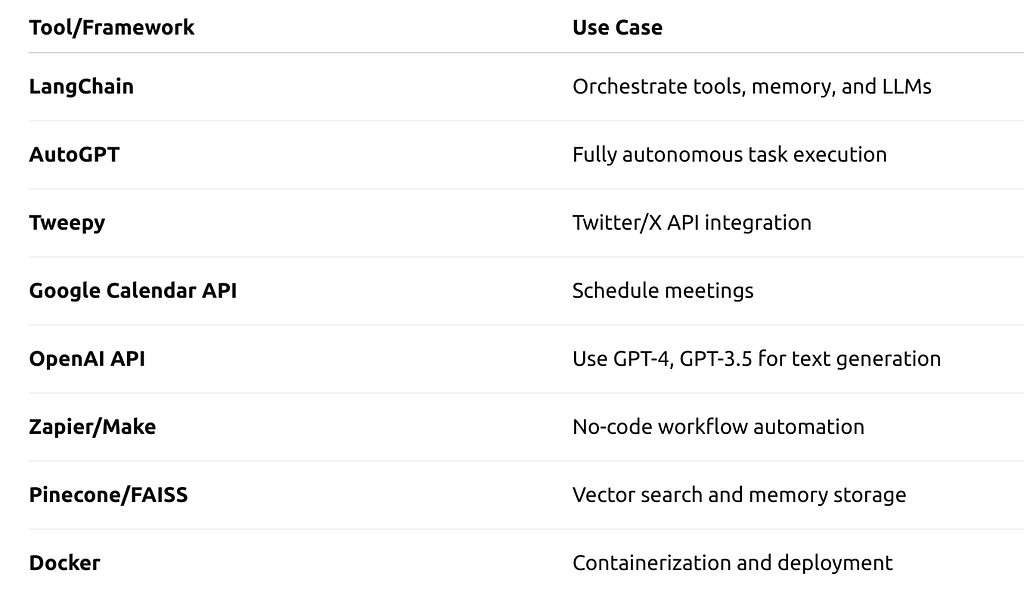
Tools & Frameworks to Build AI Agents
Best Practices When You Create AI Agents
Challenges in AI Agent Development
Future Trends in Work Automation with AI
Final Thoughts
An AI agent is a software entity that performs tasks or makes decisions autonomously using artificial intelligence techniques. These agents can understand instructions, learn from feedback, interact with APIs or systems, and take action based on goals or rules.
Types of AI Agents:
Reflex agents: Basic condition-action models
Model-based agents: Use memory for improved decision-making
Goal-based agents: Act to achieve specific objectives
Utility-based agents: Maximize a utility function
Learning agents: Improve over time using data
Automating work with AI agents helps reduce human effort and error, speeds up operations, and boosts overall productivity.
Benefits:
✦Save time on repetitive tasks
✦Minimize human error
✦Increase focus on creative or strategic tasks
✦Enable 24/7 task execution
✦Integrate with multiple platforms like email, Slack, Notion, etc.
Businesses and individuals are increasingly investing in AI agent development to transform how they manage workflows, customer support, task planning, and more.
Before you create AI agents, it helps to know what kinds of tasks they can automate:
1. Email Sorting and Replies
✦Automatically read and categorize emails
✦Respond to FAQs or schedule appointments
2. Meeting Scheduling
✦Integrate with Google Calendar or Outlook
✦Find time slots, send invites, and reschedule if needed
3. To-Do List Management
✦Track tasks using apps like Notion, Trello, or Todoist
✦Set reminders and update status automatically
4. Data Entry and Reports
✦Extract data from documents, emails, or websites
✦Auto-generate reports and send them
5. Social Media Updates
✦Schedule and post updates on Twitter, LinkedIn
✦Analyze engagement metrics
To build an AI agent, you’ll need a few technical and conceptual prerequisites:
Technical Skills:
✦Programming (Python is most common)
✦Basic knowledge of AI/ML concepts
✦Understanding APIs and integrations
Tools & Tech Stack:
✦OpenAI, Anthropic, or Cohere for LLMs
✦LangChain, AutoGPT, or CrewAI for orchestration
✦Pinecone or FAISS for vector search
✦Zapier or Make for workflow automation
✦Docker, GitHub for deployment
Let’s walk through how to create an AI agent that automates your daily work.
Step 1: Define the Purpose
Decide the exact task(s) you want to automate. Examples:
✦“Sort my inbox every morning and notify me of high-priority emails”
✦“Schedule meetings with team members and send summaries”
Step 2: Choose an AI Model
✦Identify the best-fit AI model for your intended task.
✦GPT-4 or Claude for natural language processing tasks
✦Custom-trained models for niche domains
Step 3: Use LangChain or CrewAI
Frameworks like LangChain or CrewAI let you connect language models with tools, memory, and agents.
Example LangChain setup:
from langchain.agents import initialize_agent
from langchain.llms import OpenAI

agent = initialize_agent(tools=[tool1, tool2], llm=OpenAI(), agent_type="zero-shot-react-description")
Step 4: Add Tools and APIs
Use APIs to let the agent:
✦Access Google Calendar
✦Send emails via SMTP
✦Post tweets via Twitter API
✦Store context in a vector DB
Example:
import tweepy

client = tweepy.Client(bearer_token='XXX')
client.create_tweet(text="Automated update by AI Agent")
Step 5: Set Triggers and Workflows
Use:
✦Zapier to trigger the agent on new emails or tasks
✦CRON jobs to run the agent at specific times
✦Webhooks to trigger on-demand
Step 6: Test and Refine
Let the AI agent run in a sandbox. Monitor:
✦Accuracy
✦Latency
✦Error handling
Add fallback rules or human-in-the-loop if needed.
Check out the best platforms available for AI agent development.
To ensure your agent is effective and secure:
✦Define clear boundaries for autonomy
✦Use secure authentication for APIs
✦Implement error handling
✦Log interactions for debugging and analysis
✦Design your system with user override features for full control
✦Continuously refine based on feedback
When you build AI agents for real-world use, safety and usability must be top priorities.
While it’s easy to prototype an agent, deploying one for real-world use has challenges:
Context management: Keeping memory and history accurate
API limits: Rate limits and costs with GPT or external APIs
Security: Safely storing tokens and user data
Error propagation: An LLM hallucinating could cause cascading issues
Overfitting workflows: Agents that are too rigid or too vague
Mitigation involves tight feedback loops, error handling, and modular design.
The future of work is undoubtedly AI-powered. Here’s where the trend is heading:
✦ Agentic Workflows
Multiple agents collaborating like a team (e.g., researcher + analyst + summarizer)
✦ Personal AI Employees
A “virtual teammate” who handles communications, reports, tasks, etc.
✦ AI for Decision Making
Agents not just doing tasks, but making decisions backed by data and reasoning.
✦ Integration into Platforms
Services such as Slack, Notion, and Gmail are poised to offer native agent capabilities in the near future.
Creating an AI agent that automates your daily work is no longer a sci-fi dream. With frameworks like LangChain, powerful models like GPT-4, and easy access to APIs, anyone with some coding knowledge can build productivity-boosting agents.
Whether you’re trying to save time, reduce cognitive load, or improve your business operations, now is the time to create AI agents tailored to your workflow. Start small, iterate fast, and scale gradually.
How to Create an AI Agent That Automates Your Daily Work? was originally published in Coinmonks on Medium, where people are continuing the conversation by highlighting and responding to this story.





