
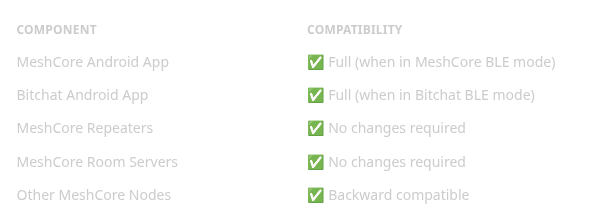
The Bitchat integration enables MeshCore devices to communicate with the Bitchat Android app through a bridge layer that translates between Bitchat protocol and MeshCore mesh networking. This is an additive feature that preserves all existing MeshCore functionality while adding Bitchat compatibility.
┌──────────────────────────────────────────────────────────────────────────┐
│                            MeshCore Device                               │
├──────────────────────────────────────────────────────────────────────────┤
│                                                                          │
│  ┌─────────────────────────────┐    ┌────────────────────────────────┐  │
│  │    WITH DISPLAY (Menu)      │    │     BUTTON-ONLY (T1000-E)      │  │
│  │   ┌─────────────────────┐   │    │   ┌────────────────────────┐   │  │
│  │   │   BITCHAT Page      │   │    │   │   5x Button Press      │   │  │
│  │   │  ┌─────┐  ┌─────┐   │   │    │   │   (Quintuple)          │   │  │
│  │   │  │  M  │  │  B  │   │   │    │   │  ┌──────────────────┐  │   │  │
│  │   │  │Mesh │  │BitC │   │   │    │   │  │ LED: 3 blinks    │  │   │  │
│  │   │  └──┬──┘  └──┬──┘   │   │    │   │  │ Buzzer: tone     │  │   │  │
│  │   │     └────┬───┘      │   │    │   │  └────────┬─────────┘  │   │  │
│  │   └──────────┼──────────┘   │    │   └───────────┼────────────┘   │  │
│  └──────────────┼──────────────┘    └───────────────┼────────────────┘  │
│                 │                                   │                    │
│                 └───────────────────┬───────────────┘                    │
│                                     ▼                                    │
│  ┌────────────────────────────────────────────────────────────────────┐ │
│  │                    SerialBLEInterface                               │ │
│  │  • MeshCore UART Service (6E400001-B5A3-F393-E0A9-E50E24DCCA9E)    │ │
│  │  • Bitchat Service (F47B5E2D-4A9E-4C5A-9B3F-8E1D2C3A4B5C)        │ │
│  │  • Only ONE service advertised at a time                           │ │
│  │  • Auto-disconnects clients on mode switch                         │ │
│  │  • PIN auth (MeshCore) / Open access (Bitchat)                    │ │
│  └────────────────────────────────┬───────────────────────────────────┘ │
│                                   │                                      │
│                       ┌───────────▼────────────┐                        │
│                       │    BitchatBridge       │                        │
│                       │  • Encapsulate         │──► MeshCore GRP/TXT    │
│                       │  • Decapsulate         │◄── BC magic header     │
│                       │  • Loop prevention     │                        │
│                       └───────────┬────────────┘                        │
│                                   │                                      │
│                       ┌───────────▼────────────┐                        │
│                       │       MyMesh           │                        │
│                       │     (MeshCore)         │                        │
│                       └───────────┬────────────┘                        │
│                                   │                                      │
│                       ┌───────────▼────────────┐                        │
│                       │     LoRa Radio         │                        │
│                       │    (SX1262/etc)        │                        │
│                       └────────────────────────┘                        │
└──────────────────────────────────────────────────────────────────────────┘
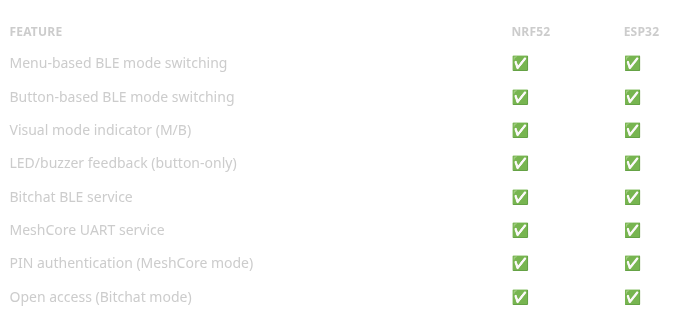
Navigate to the BITCHAT page and press ENTER to toggle between modes. Display shows large M (MeshCore) or B (Bitchat).
Press the user button 5 times rapidly (within ~3 seconds) to toggle modes. See Button-Based Mode Switching for details.
Add to your platformio.ini:
build_flags =
    -D ENABLE_BITCHAT=1
    -D BLE_MODE_SWITCHING=1
Bitchat requires either a display with buttons OR button-only with LED feedback for mode switching.
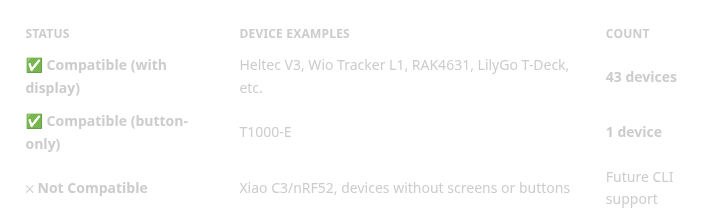
📋 See Complete Device List — Find your specific device
# Build with Bitchat support
export ENABLE_BITCHAT=1
pio run -e WioTrackerL1_companion_radio_ble
Bitchat mode is controlled on-device via the UI or button presses:
With Display:
Button-Only (T1000-E):
Note: The device always boots in MeshCore mode. Mode is not persisted across reboots.
The #mesh hashtag channel is the primary interoperability channel between Bitchat and MeshCore.
#mesh secret = first_16_bytes(SHA256("#mesh"))
             = 0x5B664CDE0B08B220612113DB980650F3
The channel secret is the first 16 bytes of the SHA256 hash of the UTF-8 encoded channel name string (including the # prefix).
Both Bitchat Android app and MeshCore firmware derive the same channel secret using this mechanism, enabling seamless group messaging.
See Protocol Specification for technical details.
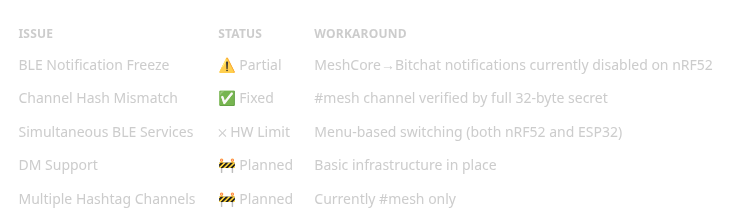
Due to BLE advertising size constraints, both nRF52 and ESP32 platforms use menu-based switching rather than simultaneous services:
Navigation:
Platform-Specific Implementation:
Both platforms provide identical user experience for mode switching.
Bitchat Integration for MeshCore was originally published in Coinmonks on Medium, where people are continuing the conversation by highlighting and responding to this story.





