Response speed decides who stays and who leaves. Here is how automated WhatsApp is quietly becoming the retention layer for modern businesses.
Ask any founder where they lose customers, and support will come up fast. An order looks stuck. A signup step confuses someone late at night. A reminder arrives too late to matter. In a market where people expect instant answers, silence is the fastest way to lose trust, and trust is the only moat a growing business really has.
Email is too slow. A ticket portal feels like a wall. Social messages get buried. Meanwhile the channel most of your customers already check every hour sits unused: WhatsApp.
WhatsApp automation software is how serious teams are turning that channel into a real support and retention engine. Not a spam blaster. A system that answers instantly, remembers every customer, and follows up on its own. Here is how it works and why it matters for any business trying to grow without drowning in messages.
WhatsApp automation software runs on the official WhatsApp Business API. It sits on top of that API and handles the parts humans should not be doing by hand: instant replies, guided menus, confirmations, alerts, and follow-ups.
Think of the API as the rails and the software as the train, the schedule, and the station. The API lets you send and receive messages programmatically. The software gives you a visual flow builder, a contact database, campaign tools, analytics, and a shared inbox so your team can run the channel without writing code for every reply.
If you are new to the channel and want to see how access works before anything else, start with this WhatsApp Business API setup guide, which covers verification and number warm-up in plain language.
Customer support has three problems that automation is built to solve.
Speed. People expect answers in seconds, not hours. Every minute of waiting raises the chance they leave. A bot that answers common questions instantly keeps customers calm and keeps them with you.
Scale. A promotion or a busy season can multiply your message volume overnight. Human teams cannot scale that fast. Software can greet thousands of people at once and route only the hard cases to a person.
Consistency. A verified WhatsApp Business number with clean, templated messages gives customers a trustworthy reference point, so your real messages are easy to recognize and act on.
Put simply, automation turns WhatsApp from a personal chat app into infrastructure your operation can measure and defend.
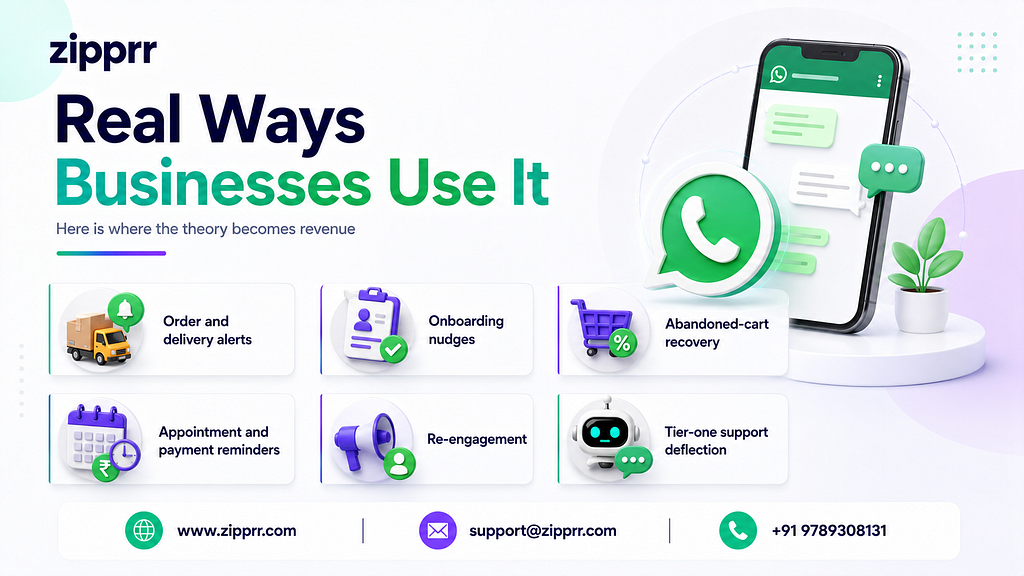
Here is where the theory becomes revenue.
Order and delivery alerts. The moment an order ships or a status changes, the customer gets a message. Fewer anxious tickets, fewer where-is-my-order pings.
Onboarding nudges. Users who stall halfway through signup get a friendly reminder with a direct link to finish. Completed onboarding means active customers.
Abandoned-cart recovery. A shopper who leaves without paying gets a timely reminder, and a real share of them come back to complete the purchase.
Appointment and payment reminders. Automated nudges cut no-shows and recover overdue invoices without anyone playing bad cop.
Re-engagement. Dormant customers receive a targeted, permission-based message about a new product or offer, without spamming a public feed.
Tier-one support deflection. Questions about hours, pricing, returns, or account status get answered by a bot instantly, freeing agents for genuine problems.
The mistake I see teams make is hiring more support agents when they should be building better flows. A well-designed bot handles the repetitive 70 percent so your humans can own the critical 30 percent.
You do not need engineers for most of this. If you are weighing how to actually build these conversations, a visual WhatsApp chatbot builder lets your support or marketing lead design menus, answers, and escalation rules by dragging blocks around. Engineering time goes only to the integrations that truly need it, like wiring your order system into the alert flow.
The feature that changes everything is not the bot. It is memory.
When your WhatsApp platform is connected to your customer data, every conversation knows who it is talking to. A returning customer does not get asked their details again. A high-value buyer gets routed to priority support automatically. That memory is also what makes your analytics honest, because you can finally see which messages reduce churn, which flows convert, and what the channel returns.
WhatsApp is a permission channel, and that is a feature, not a limitation. Only message customers who opted in. Make opting out easy. Use approved templates for anything you send first. Honor privacy rules like GDPR with proper consent and data controls.
Handled well, this discipline is exactly what separates a trusted brand from an account that gets reported and banned. Respect the inbox, and the inbox rewards you with attention.
Business moves fast, and customers judge you by how fast you respond when something matters to them. WhatsApp automation software like Zipprr gives teams a way to answer instantly, alert people the moment something happens, and follow up without lifting a finger, all on a channel people actually check.
Start with one flow. Prove the retention lift. When you are ready to make it feel personal at scale, connecting your customer records through a WhatsApp CRM integration is the step that turns a helpful bot into a channel your whole business runs on.
If you are still running support out of a shared inbox or a cluttered social feed, a platform like Zipprr is the upgrade worth making first.
Is WhatsApp automation safe for my business? Yes, WhatsApp automation is safe when you use the official WhatsApp Business API, verify your business, collect customer opt-in, and send approved templates. A verified badge and consistent messaging also help customers recognize your genuine messages, which lowers the risk of impersonation, spam complaints, or account bans.
How does WhatsApp automation software actually work? WhatsApp automation software connects to the WhatsApp Business API and uses rules and chatbots to answer incoming messages automatically. It sends approved templates for alerts and campaigns, routes complex cases to human agents, and syncs contacts and events with your CRM so every conversation stays organized and trackable.
Can WhatsApp automation send order and delivery alerts? Yes, WhatsApp automation can send order and delivery alerts automatically. When your system confirms an event like a shipped or delivered order, the platform triggers an instant WhatsApp message to that customer. This keeps buyers informed in real time and sharply reduces where-is-my-order support tickets and follow-up calls.
Will WhatsApp automation replace my support team? No, WhatsApp automation does not replace your support team. It handles repetitive questions like hours, pricing, and order status, then routes complex or sensitive issues to human agents. Your people stay in control of the conversations that need judgment, while the bot removes the busywork that slows everyone down.
How much does WhatsApp automation software cost? WhatsApp automation software usually costs a monthly software subscription plus WhatsApp conversation-based charges that vary by country and message category. Budget for both parts, since the platform fee covers features and the per-conversation fee covers messaging. Many providers offer tiered plans that scale with your contact and message volume.
How do I stop my WhatsApp number from getting banned? To keep your WhatsApp number safe, always use the official Business API, collect genuine opt-in, send relevant and expected messages, and honor every opt-out quickly. Warm up new numbers by increasing volume gradually. These habits protect your quality rating, which is the main signal WhatsApp uses to limit or ban numbers.
Can WhatsApp automation help recover abandoned carts? Yes, WhatsApp automation is one of the strongest tools for recovering abandoned carts. When a shopper leaves without paying, an event trigger sends a friendly reminder a short time later, often with a direct checkout link. A meaningful share of those shoppers return, which lifts revenue with almost no manual effort.
Does WhatsApp automation work with my store or CRM? Yes, most WhatsApp automation platforms connect to your store and CRM through REST APIs and webhooks. This lets alerts fire from real events like new orders and syncs customer data in both directions. As a result, every conversation carries context, and your records stay updated without any manual copying.
Is WhatsApp better than email or social media for support? For one-to-one support and reminders, WhatsApp usually beats email and social media. It is private, permission-based, and reaches people on a channel they check constantly, so messages get opened and answered faster. Email is slower, and social inboxes bury conversations, which makes both harder to manage at scale.
How quickly can I launch WhatsApp automation? You can launch a basic WhatsApp automation setup in just a few days. The main lead times are getting WhatsApp Business API access, completing business verification, and having your message templates approved. Once those are done, you can build a simple welcome flow, connect your data, and go live quickly.
How Smart Businesses Are Using WhatsApp Automation to Keep Customers and Cut Support Costs was originally published in Coinmonks on Medium, where people are continuing the conversation by highlighting and responding to this story.